Automatically save TikTok Stories before they disappear.
Enter a username to see a creator's current public Stories now. Monitor them with a free account, and StoryHideout saves the new Stories it detects.
- Auto Monitoring
- Story History
- No TikTok Login
How the TikTok Story Saver works
A lookup shows what a creator has up right now. Monitoring keeps the Stories they post next.
-
Find a creator
Enter a public creator's TikTok username or profile link above to see the Stories they have up now. Viewing and downloading them needs no account and no TikTok login.
-
Choose Monitor
Create a free account if you don't have one, and the creator is added when you're done. StoryHideout then checks their public profile on a schedule.
-
Open your Story history
New Stories detected after you start monitoring are saved to your Story history, ready to watch or download. Paid plans keep them longer and can send a Telegram message when one is saved.
Saving TikTok Stories manually vs automatically
A Story is normally visible for 24 hours. You can save it yourself while it's up, as the guide on how to save a TikTok Story manually shows, or let StoryHideout do the checking.
| What happens | Saving manually | Automatic saving with StoryHideout |
|---|---|---|
| Checking for new Stories | You open the creator's profile yourself | StoryHideout checks on a schedule |
| Saving a Story | You download each one you catch | New Stories it detects are saved for you |
| Coming back later | Only what you saved yourself | Your Story history, grouped by creator |
Checks run on a schedule, so a Story that is posted and removed between two checks can be missed.
Your Stories, saved automatically
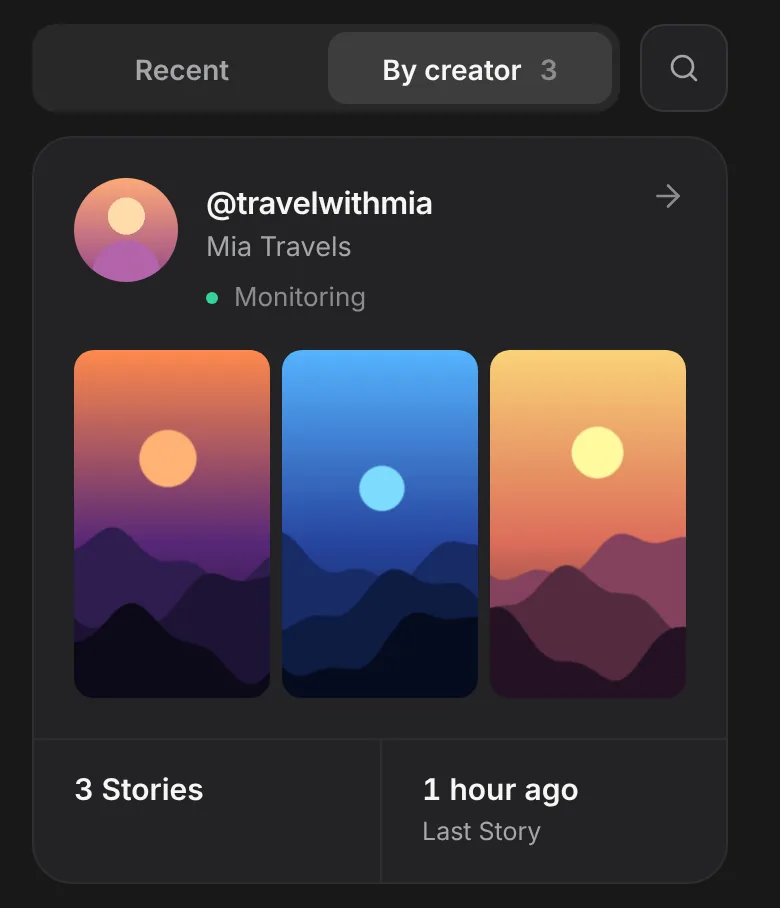
Every new Story StoryHideout detects from the creators you monitor appears in your Story library, grouped by creator with the time it was captured.
Your Story history starts when you begin monitoring a creator. Stories from before monitoring started are not automatically recovered.
Frequently asked questions
What is a TikTok Story Saver?
A TikTok Story Saver keeps a copy of a Story after TikTok stops showing it. With StoryHideout you can look a creator up by username and save the Stories they have up now, or monitor them so the new Stories StoryHideout detects are saved to your Story history automatically. To browse or grab one Story without monitoring, the TikTok Story Viewer and TikTok Story Downloader do the same lookup.
Can I view TikTok Stories by username without an account?
Yes. Enter a public creator's username or profile link above to see the Stories they have up right now, and view or download them without a StoryHideout account. You don't need to paste each Story's link. For a single video, Story or photo post by link, use the free downloader. An account is only needed to monitor a creator and save their new Stories automatically: look them up above, choose Monitor and create a free account. StoryHideout never asks for your TikTok password.
How often does StoryHideout check for new Stories?
Monitored creators are checked on a background schedule, with nothing left open on your device, so a Story is saved some time after it is posted rather than the moment it goes up. How often each creator is checked depends on your plan. A Story that is posted and removed between two checks can't be detected.
How many creators can I track, and how long are Stories kept?
Creator limits and the Story history window depend on your current plan, measured from capture. See current limits in your account or the pricing comparison. Your history holds the Stories saved while you were monitoring a creator, and a Story StoryHideout saved stays there for your plan's window even after it's gone from TikTok. If you cancel, the change takes effect at the end of the paid period. Automatic Story access then follows your new plan's window.
Can I download saved Stories or get notifications?
Yes. Open a saved video or photo Story in your Story library to watch it or download it in the best available quality while it's inside your plan's history window. On paid plans, StoryHideout can also send you a Telegram message when a new Story from a creator you monitor is saved; connect Telegram in your account settings.
Does StoryHideout work with private TikTok accounts?
No. StoryHideout only saves Stories that are publicly available, and it never asks for your TikTok login or password. If a creator's Stories aren't public, StoryHideout can't see them and nothing is saved.